
Celebrating Digital Inclusion for All
Global Accessibility Awareness Day (GAAD) is on May 21, 2026. It’s a day to celebrate digital inclusion for all.
Wire Media joins the GAAD Foundation in its mission to make accessibility a core requirement, not an afterthought. To that end, we put accessibility at the heart of our web design practice. It is built-in to every step of our process. We education and train clients on it. And we constantly strive to increase our own knowledge and awareness of how to make accessible websites, and the challenges people face when sites are not accessible.
Introducing: The Alt Text Decision Tree!
The GAAD website states that missing or incorrect “alt text” is the second most common accessibility failure on one million website homepages, citing a test conducted by WebAIM in 2020. WebAIM updated it in 2026, and “alt text” is still in second place.
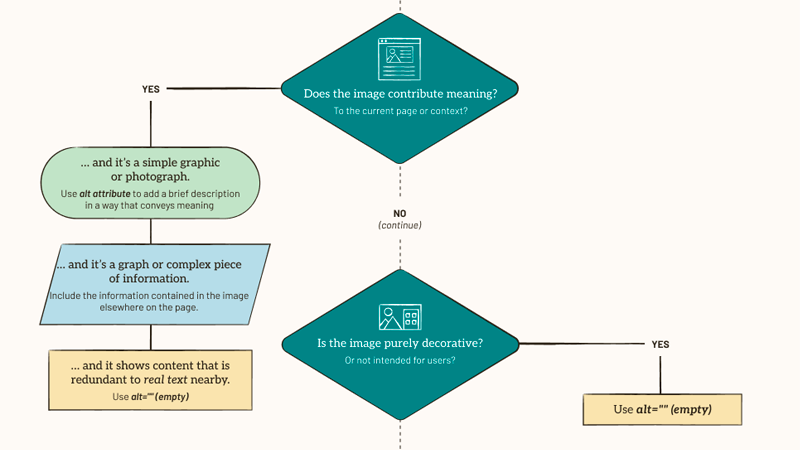
The World Wide Web Consortium has on its website, a text-based decision tree to guide people towards correct usage of the alt attribute for images. In celebration of Global Accessibility Awareness Day, we created a flow chart of the decision tree in the following JPG graphic. If you are using a screen reader, or cannot see the graphic for any reason, please access the same content on the W3C site.
Challenges creating this in PDF format
We attempted to create it in PDF format as well. It was quite a learning curve!
It’s not perfect as it does not read the legend information. We have not figured out a way to export this design file from Figma to PDF in a way that captures both images and text.
The idea was to have the screen reader read the legend as follows, “Legend. Image. Diamond. Decision question.” Where “diamond” would be the alt text of the legend image. Then, when we get to a decision question such as the first one, the screen reader would say, “Image. Diamond decision question.” Where “diamond decision question” is the alt text. But after spending four hours just getting the reading order correct for the main decision tree, we decided to try again later.
We did learn that if the design has text overlapping an image, and you export to PDF, it is practically impossible to tag the text. So we created an alternative design for the PDF format. We tried a plugin for Figma that is supposed to help prepare the Figma file to export to PDF such that is can be tagged correctly to get the correct reading order. The plugin was in Spanish, and while we don’t speak much Spanish, we made it work. It seemed to work in Figma anyway. But when we exported the PDF and opened in Acrobat, none of the tagging was preserved.
Accessibility is a Journey
Making digital content accessible is a journey and we will keep trying new tools, learning new skills, and doing our best to make all digital content we touch be accessible.
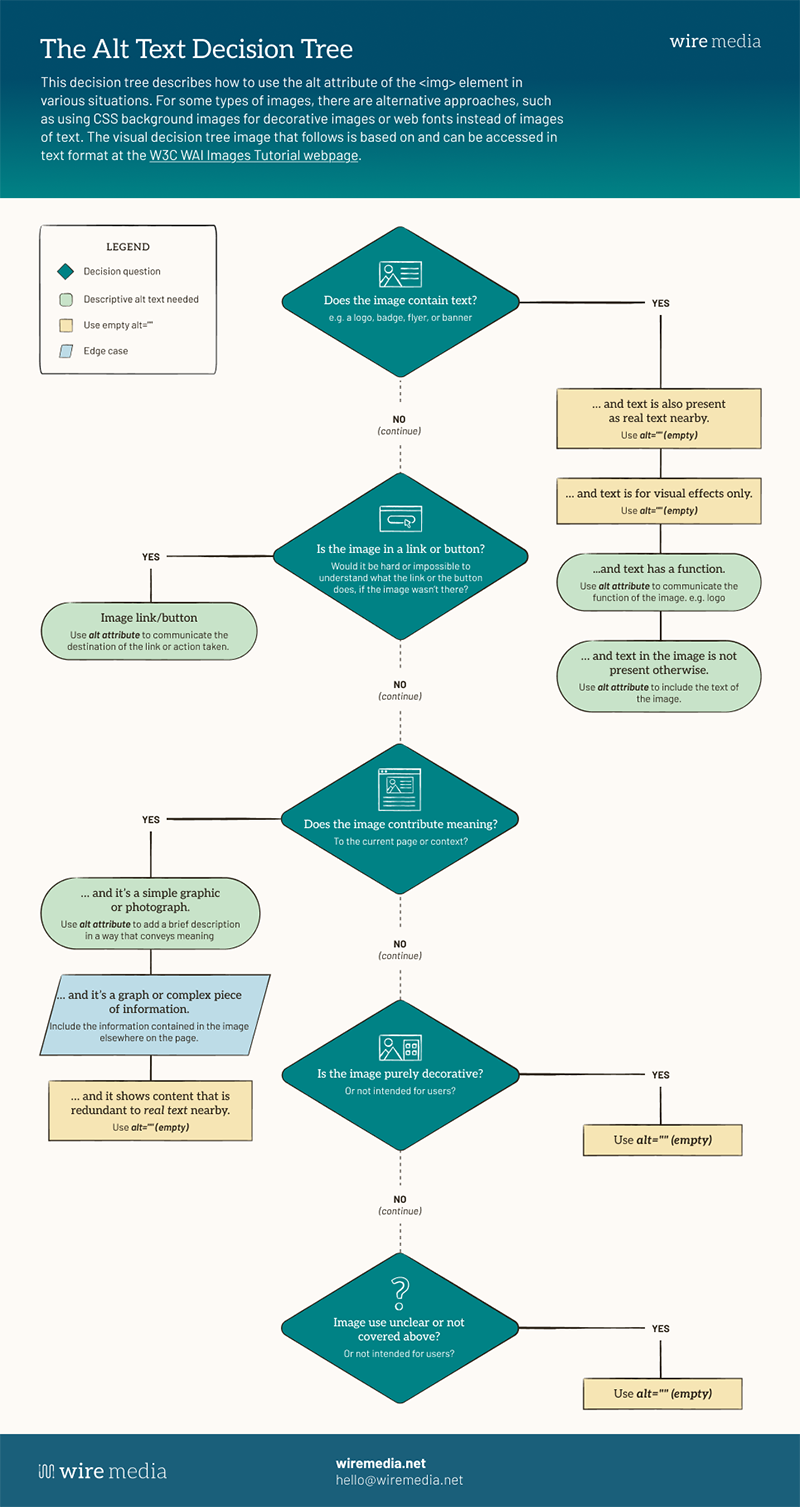
If you have trouble viewing the decision tree image, please refer to the original text version on the W3C website.

Book a time to speak with our accessibility experts about options to make your site more accessible. Options include accessibility audits, trainings, remediation, and more.
Book a Call